First Person Boxing Game Android: How to Play on Roblox
Play the first person boxing game Android players use through the Roblox app. Learn the touch setup, reported codes, settings, and styles for First Person Boxing.
Published: First Person Boxing Wiki Editorial Team
Table of Contents
Playing First Person Boxing on Android Through Roblox
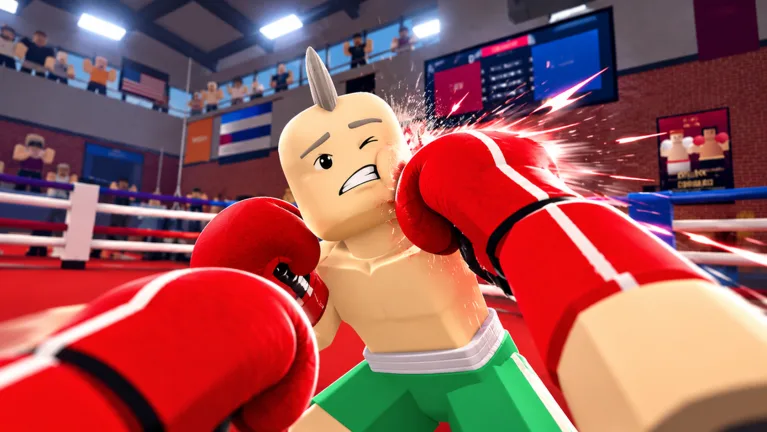
Searching for a first person boxing game android release usually turns up standalone Play Store boxing apps, but First Person Boxing itself is a Roblox experience created by Can You Box?. That means Android players install the free Roblox app from Google Play, sign in, and join the experience through its official game page rather than downloading a dedicated mobile client.
The result is a true first-person boxing game on a phone: the camera sits in your fighter's head, punches and guards are timed by hand, and stamina decides how long you can keep pressing forward. As of the 2026-10-17 snapshot, the experience page listed more than 900K visits, over 7K favorites, and a 93% approval rating, with up to 16 players per server.
What the Android Version Includes
Nothing is cut down for phones. Android players join the same experience as desktop and console players, which means the same PvP matches, the same AI practice mode, and the same tutorial for learning punch timing and defensive head movement. Reported fighting styles come from the styles menu, where Style Spins and Lucky Spins are used to roll for new looks and rarities such as Legendary and Mythic.
Because everything lives on your Roblox account, progress follows you between devices. A fighter built on a phone can be taken to a PC session later, and coins earned from winning matches can be spent on more spins whenever you need them.
Feature
How It Works on Android
Why It Matters
Access
Free Roblox app from Google Play, then join via the official game page
No separate First Person Boxing download exists
Camera
True first-person view with a lock-on option
You read your opponent's gloves instead of a third-person avatar
Match Size
Up to 16 players per server
Fights stay small enough to follow on a phone screen
Progress
Styles, spins, and coins stay on your Roblox account
Switching between phone and PC keeps the same fighter
Touch Setup, Tutorial, and AI Practice
Install and sign in: Get the Roblox app from Google Play, then open your account so your spins and styles load with you.
Join the official experience: Open the First Person Boxing game page and join a server from there instead of trusting third-party links.
Run the tutorial and AI practice: Drill punch timing, guard, and head movement against AI opponents before you take on live players.
Pace your stamina: Throw short combinations and step away when your stamina drops, because empty stamina leaves you slow and open to counters.
Android play uses the Roblox mobile layout: a movement control on one side of the screen and on-screen action buttons for the rest. The reported keyboard layout on PC — WASD to move, Space + WASD to bob and weave, F to guard, Q to lock on, X for the overhand, and hold click for straight punches — is the best reference for what each action does, since the touch buttons mirror those actions rather than adding new ones. Practising on a phone is mostly about hand position, so keep your thumbs resting over the movement control and the action buttons.
Tip
Codes are the fastest free route to new styles on any device. Tap the Shop button on the left side of the screen, enter a code in the text box, and press Redeem. Reported working codes are LUCK1 (5 Style Spins), UPPERCUT (1 Lucky Spin), and FPSBOXING2 (3 Style Spins plus 1,000 Coins).
Android vs PC: What Changes and What Carries Over
The difference between Android and PC is input, not content. Both run the same Roblox experience, so styles, spins, coins, and match rules are identical; what changes is how you move, guard, and lock on. The creator's reported setup advice, such as leaving lock-on on and setting the field of view to 90–100, is worth checking in the in-game settings on your device.
The other practical difference is performance. A phone has less headroom than a desktop, so a stable connection and sensible Roblox graphics settings do more for your timing than any in-game trick. If frames drop during exchanges, lower the graphics quality before blaming your reactions.
Aspect
Android (Roblox App)
PC (Roblox Client)
Movement and punching
Roblox touch controls with on-screen action buttons
WASD, Space + WASD to bob and weave, hold click for straights, X for the overhand
Guard and lock-on
On-screen controls
F to guard and Q to lock on
Menus
On-screen buttons, including the Shop button on the left
K for customization, G for gloves, B for the shop, H for the full key list
Account and progress
Same Roblox account, same styles and spins
Same Roblox account, same styles and spins
Common Android Problems and How to Avoid Them
Warning
There is no official First Person Boxing APK. Files advertised as a standalone Android download, a modded client, or a source of free spins are not part of the experience, and codes should only ever be entered inside the in-game Shop.
Lag is the most common complaint on phones, and it usually comes from the device or the connection rather than the game itself. Closing background apps, keeping the Roblox app updated, and playing on a stable Wi-Fi network solves most of it. Touch misclicks are a separate issue: if you keep throwing the wrong punch, slow your combinations down instead of tapping faster.
[ ] Install Roblox from Google Play and join through the official game page.
[ ] Confirm you have a stable connection, since the experience has no offline mode.
[ ] Lower Roblox graphics quality if frames drop during exchanges.
[ ] Rest your thumbs over the movement control and action buttons before a match starts.
[ ] Tap the Shop button on the left to redeem reported codes such as LUCK1 and UPPERCUT.
Frequently Asked Questions
Is there a separate First Person Boxing Android download?
No. First Person Boxing is a Roblox experience, so Android players install the free Roblox app from Google Play and open the official game page. Any APK or installer claiming to be this game is not official.
Can I play First Person Boxing offline on Android?
No. Roblox experiences require an active internet connection, so mobile play is online only. Single-player content such as AI practice still runs through Roblox servers rather than offline.
Can I use a Bluetooth controller on Android?
Roblox supports external controllers on many Android devices, so a gamepad is an option if touch controls feel cramped. Touch input stays available either way, and the in-game actions are the same.
Do codes and styles work the same on Android as on PC?
Yes. Styles, spins, and coins are tied to your Roblox account, so anything you unlock on a phone carries over to PC. Redeem codes with the Shop button on the left: reported working codes are LUCK1 (5 Style Spins), UPPERCUT (1 Lucky Spin), and FPSBOXING2 (3 Style Spins + 1,000 Coins), while FPSBOXING1 has conflicting reports about whether it has expired.