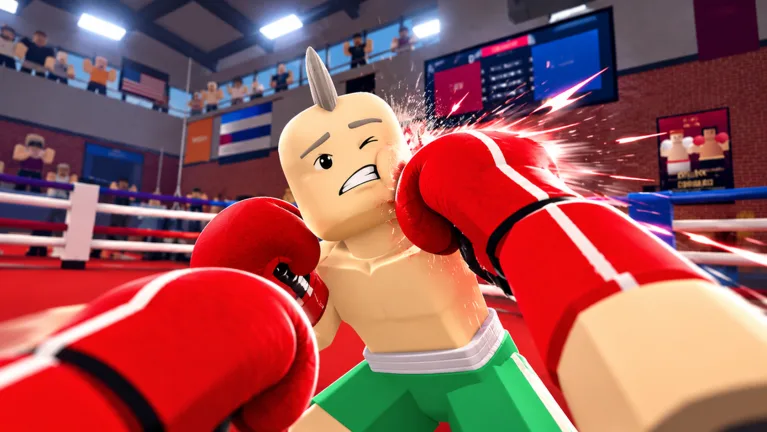
Master the first person boxing controls in Roblox to throw fast punches, slip attacks, and win every match. Discover the best tips today!
Published: First Person Boxing Wiki Editorial Team
Table of Contents
Essential First Person Boxing Controls for Roblox Competitors
Stepping into the ring without knowing your first person boxing controls is a fast track to getting knocked out on the canvas. Mastering first person boxing controls allows you to dominate opponents by throwing lightning-fast combinations while slipping incoming blows with ease. Whether you are a newcomer or looking to refine your competitive edge, understanding every button layout is vital for success.
When playing on the official Roblox Game Page for First Person Boxing, your reaction time dictates whether you become a champion or hit the floor. The developers at Can You Box? designed a fully immersive first-person combat system that rewards precise timing, stamina management, and spatial awareness. By learning how to maneuver your gloves and head position, you will secure victories even against tougher opponents.
Complete Button Layout and Keybindings
Knowing your input layout is the foundation of competitive play. The combat system relies heavily on a combination of mouse movements and keyboard shortcuts to execute precise attacks.
Standard Movement & Punching
Use standard WASD keys for footwork, hold click to extend straight punches, and press X to unleash powerful overhand strikes.
Defensive Maneuvers
Pressing the spacebar along with W, A, S, or D keys allows your fighter to bob and weave, making it much harder for opponents to land clean headshots. Press F to keep your guard up and absorb incoming blows.
To help you memorize the layout quickly, the following table breaks down the primary action inputs available in the arena.
Action / Combat Move
Default Input Key
Tactical Purpose
Straight Punch
Hold Click
Keeps opponents at a distance with continuous jabs
Overhand Strike
X Key
Delivers heavy blows that punish a lowered guard
Bob and Weave
Spacebar + WASD
Evades incoming head punches and sets up counters
Guard / Block
F Key
Absorbs incoming punches and keeps your guard tight
Target Lock-On
Q Key
Keeps your camera centered on a specific opponent
Glove Swap
Mouse Scroll
Cycles between the gloves your fighter is wearing
Glove Menu
G Key
Opens the glove selection menu
Customization Menu
K Key
Opens character customization for body type, head size, weight, and height
Join a Match
J Key
Joins a fight
Open the Shop
B Key (or the Shop button on the left)
Opens the Shop, where promo codes are redeemed
Full Keybind List
H Key
Opens the complete in-game controls list
According to player experience and community reports, adjusting your mouse sensitivity alongside these keybinds makes tracking moving targets significantly smoother.
Advanced Defensive Techniques and Head Movement
Defense separates casual fighters from elite champions in the ring. Many beginners make the critical mistake of standing completely upright, which creates a massive hitbox for opposing players to target.
Tip
Always practice your defensive head movement in the training lobby against AI before entering ranked matches. Master the timing of your ducks and sways to drain your opponent's stamina as they punch thin air.
To optimize your defensive capabilities, consider customizing your avatar's physical parameters in the customization menu. Creator and community reports suggest that selecting a lean body type and a narrow head reduces the area opponents can hit, while height is a trade-off: taller fighters are reported to hit harder but move more slowly.
Physical Attribute
Advantage
Disadvantage
Lean Body Type
Smaller target profile
Reportedly lower damage output
Narrow Head
Harder for opponents to land clean hooks
No damage trade-off reported
Below Average Height
Faster movement and punch speed
Deals slightly less damage per hit
Maximum Height
Higher damage output on heavy hits
Slower movement and reaction times
Executing Winning Punch Combinations
Throwing random punches will quickly deplete your stamina bar, leaving you vulnerable to devastating counter-attacks. Developing a rhythm with your first person boxing controls ensures every strike counts.
Lock Your Target: Press the Q key to lock onto your opponent so your camera stays focused during intense exchanges.
Initiate with Body Shots: Aim your gloves lower and land two quick body blows to lower your opponent's guard.
Follow Up with Hooks: Shift your aim upward and release a powerful hook or overhand strike to catch your dazed opponent off guard.
A popular community strategy involves redeeming reported promo codes, such as those covered by gaming sites like GameRant, to acquire free spins. These spins allow you to unlock superior fighting styles, such as the Peekaboo style, which glues your gloves to your cheeks and enhances side-to-side bobbing movements.
Optimizing In-Game Settings for Maximum Performance
Your video settings and camera configurations play an enormous role in competitive combat. Default settings often restrict your field of view (FOV), making it difficult to spot incoming hooks from your peripheral vision.
Increase your Field of View (FOV) to 90 for better situational awareness.
Turn off the "Head moves with punches" setting to stabilize your visual feed during intense rallies.
Enable target lock-on preferences in your settings menu to streamline tracking.
Fine-tune your mouse sensitivity for rapid glove positioning.
By configuring these settings properly, you eliminate screen jitter and maintain absolute clarity during fast-paced championship bouts.
Frequently Asked Questions
What are the main first person boxing controls for punching?
You can throw straight punches by holding down your click button, unleash heavy overhand strikes by pressing the X key, and execute low body shots by aiming your gloves downward.
How do I dodge incoming attacks in the ring?
You can evade punches by pressing the spacebar in combination with the W, A, S, or D movement keys, allowing your fighter to bob and weave away from danger.
How can I lock onto my opponent during a fight?
Pressing the Q key activates the target lock-on feature, keeping your camera focused directly on your opponent so you never lose sight of them during fast exchanges.
Where can I find more styles to improve my combat performance?
You can redeem reported promo codes in the Shop menu — press B or click the Shop button on the left — to receive free style spins and lucky spins, giving you a chance to unlock top-tier fighting styles like Peekaboo.